01SelfHost
本文最后更新于 2026-07-12 10:49:07
Self Host
移动光猫
UNG953H1-S
1:先查看光猫背面的用户名和密码。
2:浏览器输入http://192.168.1.1/webcmcc/telnet.html即可开启成功。
3:使用telnet登录光猫。输入光猫背面标签上的USER的用户名和密码登录telnet。
4:1.cd /config/workb 然后再输入ls再按回车键 一般会出现backup_lastgood.xml文件。
2.输入grep -i -n “admin” backup_lastgood.xml来查询所有账号的用户名。
3.输入grep -i -n “password” backup_lastgood.xml来查询所有账号的密码。
OpenWRT
扩容
安装 cfdisk , block-mount
挂载点设置 关闭自动挂载
ssh
- cat /proc/partitions ,查看分区信息
- cfdisk /dev/mmcblk1 , 选择最后的free space 新建分区, 保存退出 ( /dev/mmcblk1 根据分区信息填)
mkfs.ext4 /dev/mmcblk1p3新分区格式化为ext4
挂载点设置
- 新增新分区的挂载点 到 /mnt/sda3
- 保存设置
- cp -r /overlay/* /mnt/sda3
- 删除挂载点
- 新增新分区的挂载点 为 /overlay
- 保存 重启
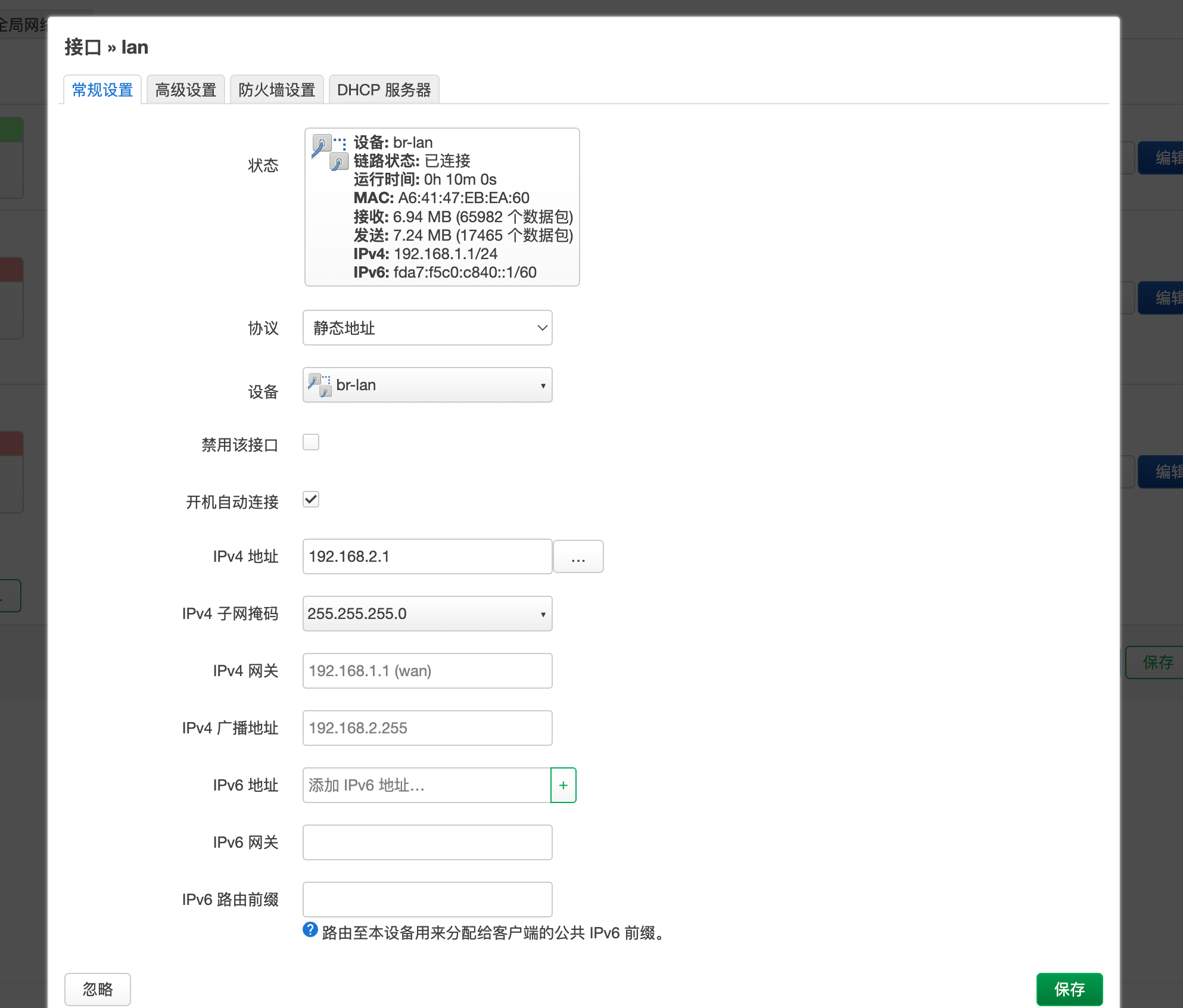
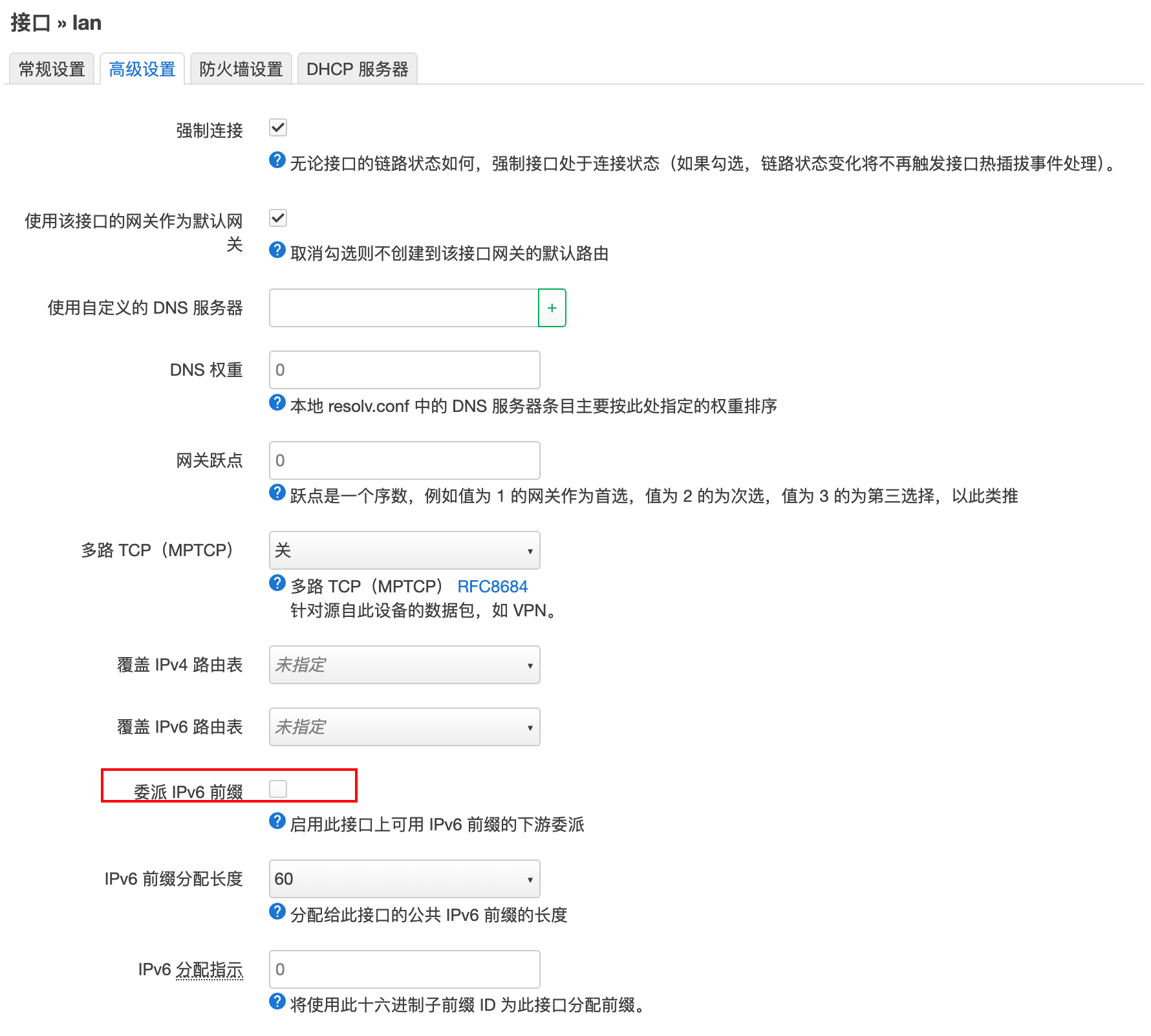
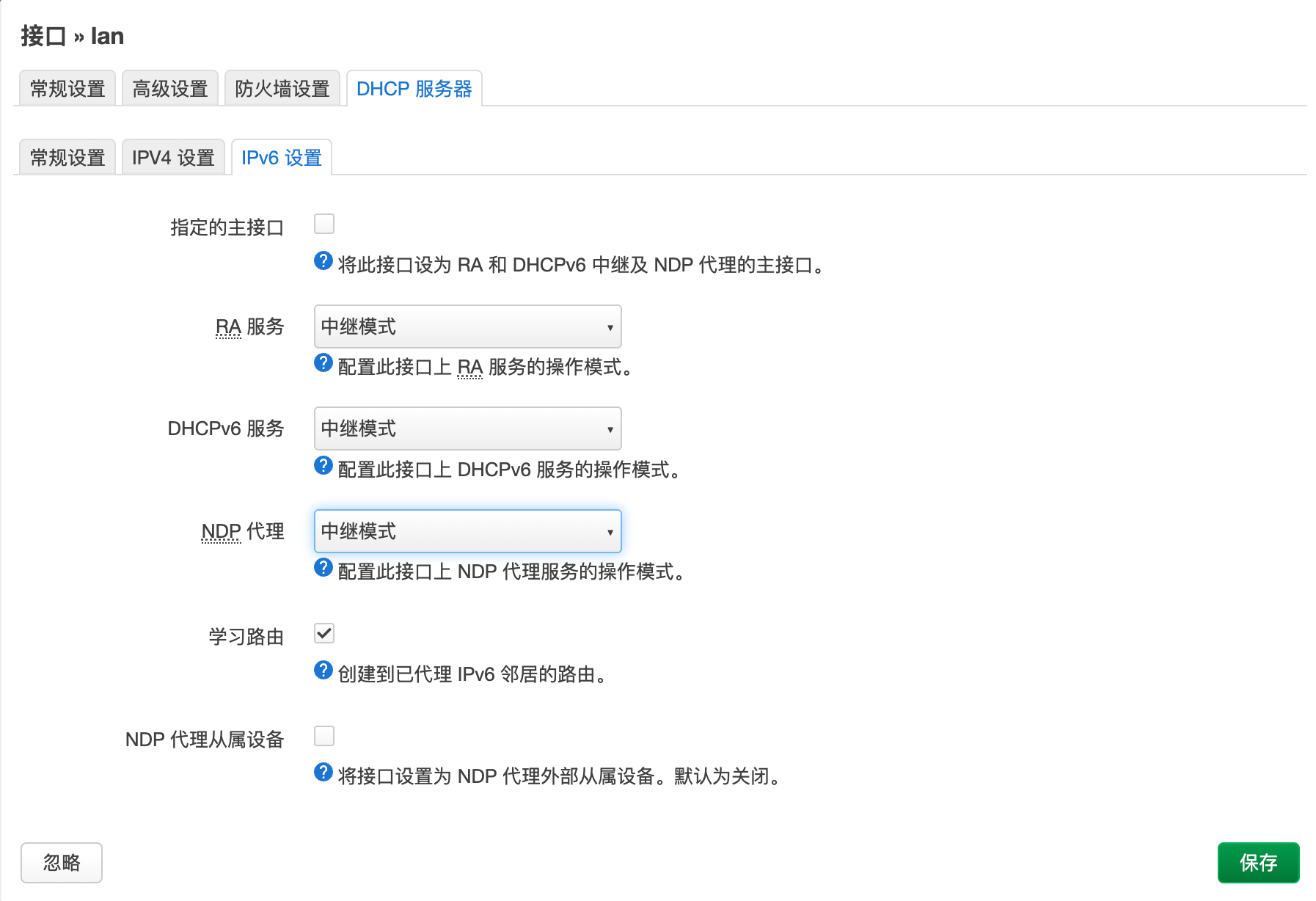
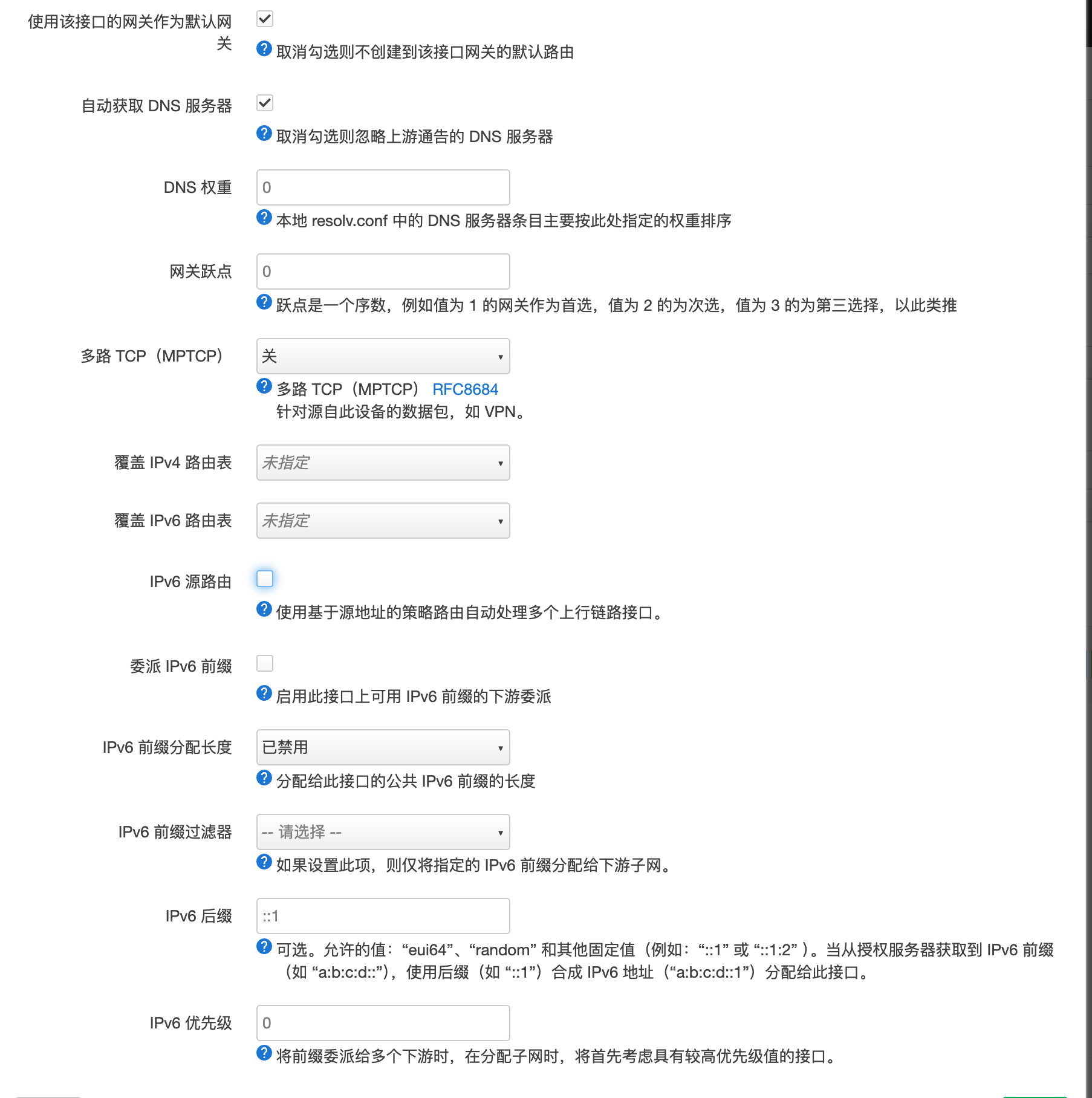
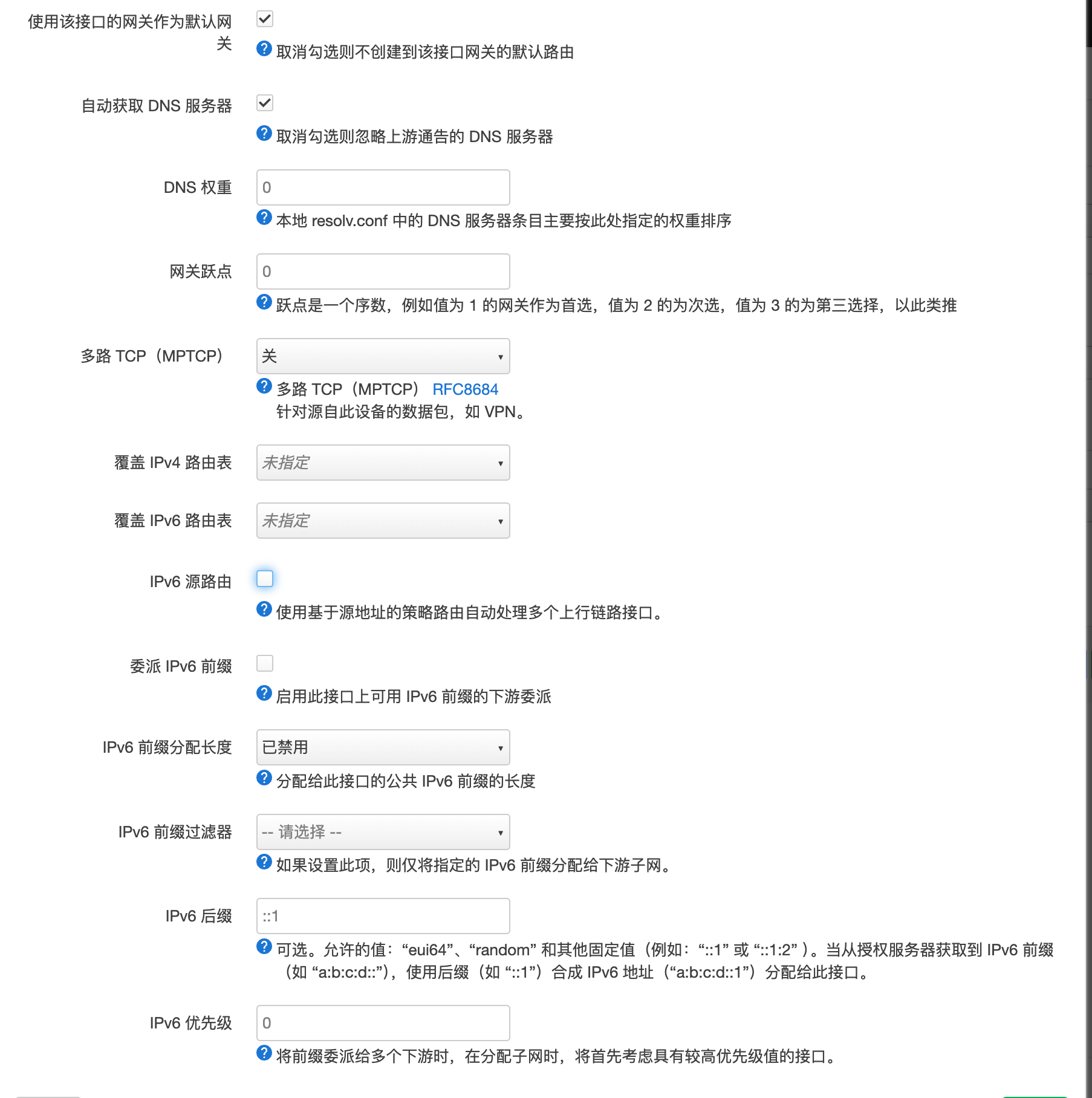
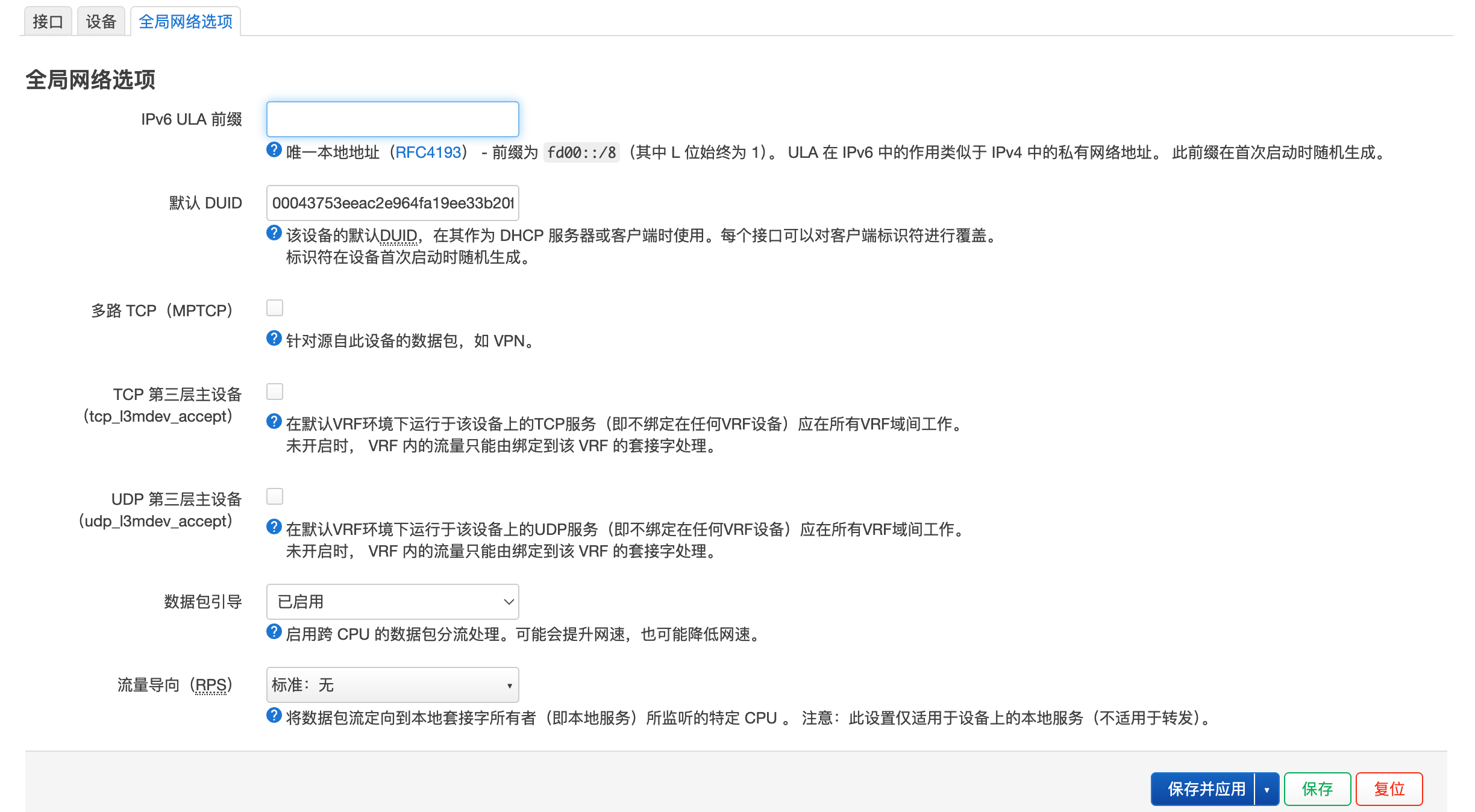
接口设置
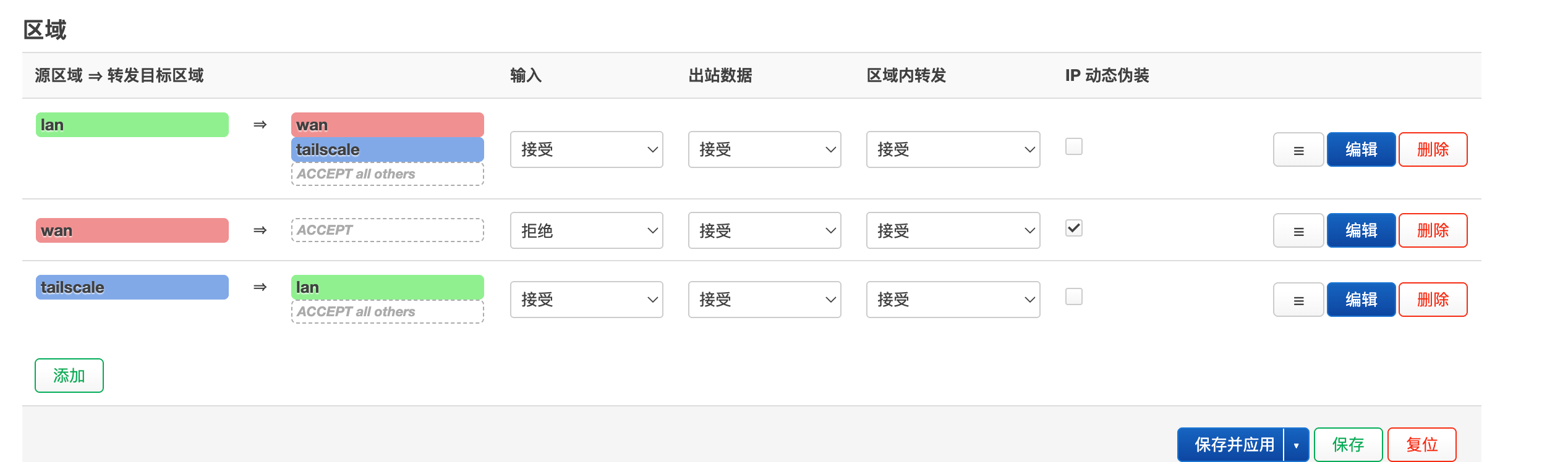
防火墙
iptables IP转发
#!/bin/bash
set -e

########################################
# root check
########################################
if [ "$EUID" -ne 0 ]; then
    echo "root required"
    exit 1
fi

########################################
# enable ip forward
########################################
enable_ip_forward() {
    sysctl -w net.ipv4.ip_forward=1 >/dev/null
    grep -q "net.ipv4.ip_forward=1" /etc/sysctl.conf || \
        echo "net.ipv4.ip_forward=1" >> /etc/sysctl.conf
}

########################################
# save rules
########################################
save_rules() {
    command -v iptables-save >/dev/null && \
        iptables-save > /etc/iptables/rules.v4 2>/dev/null || true
}

########################################
# interfaces
########################################
get_ifaces() {
    ip -o link show | awk -F': ' '{print $2}' | grep -v lo
}

select_iface() {
    mapfile -t IFACES < <(get_ifaces)

    echo "==== IFACES ===="
    for i in "${!IFACES[@]}"; do
        echo "$((i+1))) ${IFACES[$i]}"
    done

    read -p "FROM (WAN): " f
    read -p "TO   (LAN): " t

    FROM_IF="${IFACES[$((f-1))]}"
    TO_IF="${IFACES[$((t-1))]}"
}

########################################
# SHOW
########################################
show_rules() {

echo ""
echo "======================== FORWARD ========================"
iptables -L FORWARD -n -v --line-numbers

echo ""
echo "======================== NAT PREROUTING ========================"
iptables -t nat -L PREROUTING -n -v --line-numbers

echo ""
echo "======================== NAT POSTROUTING ========================"
iptables -t nat -L POSTROUTING -n -v --line-numbers
}

########################################
# ADD RULE
########################################
add_rule() {

    read -p "From Port (WAN): " FROM_PORT
    read -p "To IP (LAN): " TO_IP
    read -p "To Port (LAN): " TO_PORT

    COMMENT="fw_${FROM_PORT}_${TO_IP}_${TO_PORT}"

    for PROTO in tcp udp; do

        ########################################
        # FORWARD
        ########################################
        iptables -I FORWARD 1 \
            -i "$FROM_IF" -o "$TO_IF" \
            -p $PROTO -d "$TO_IP" \
            --dport "$TO_PORT" \
            -m comment --comment "$COMMENT" \
            -j ACCEPT

        ########################################
        # PREROUTING DNAT
        ########################################
        iptables -t nat -I PREROUTING 1 \
            -i "$FROM_IF" -p $PROTO \
            --dport "$FROM_PORT" \
            -j DNAT --to "$TO_IP:$TO_PORT" \
            -m comment --comment "$COMMENT"

        ########################################
        # POSTROUTING MASQUERADE
        ########################################
        iptables -t nat -I POSTROUTING 1 \
            -d "$TO_IP" -p $PROTO --dport "$TO_PORT" \
            -j MASQUERADE \
            -m comment --comment "$COMMENT"

    done

    save_rules
    echo "added: $COMMENT"
}

########################################
# DELETE RULE
########################################
delete_rule() {

    read -p "From Port: " FROM_PORT
    read -p "To IP: " TO_IP
    read -p "To Port: " TO_PORT

    COMMENT="fw_${FROM_PORT}_${TO_IP}_${TO_PORT}"

    echo "deleting: $COMMENT"

    # FORWARD
    while true; do
        LINE=$(iptables -L FORWARD --line-numbers -n | grep "$COMMENT" | awk 'NR==1{print $1}')
        [ -z "$LINE" ] && break
        iptables -D FORWARD "$LINE"
    done

    # PREROUTING
    while true; do
        LINE=$(iptables -t nat -L PREROUTING --line-numbers -n | grep "$COMMENT" | awk 'NR==1{print $1}')
        [ -z "$LINE" ] && break
        iptables -t nat -D PREROUTING "$LINE"
    done

    # POSTROUTING
    while true; do
        LINE=$(iptables -t nat -L POSTROUTING --line-numbers -n | grep "$COMMENT" | awk 'NR==1{print $1}')
        [ -z "$LINE" ] && break
        iptables -t nat -D POSTROUTING "$LINE"
    done

    save_rules
    echo "deleted: $COMMENT"
}

########################################
# MAIN
########################################
main() {

    enable_ip_forward
    select_iface

    while true; do
        clear

        show_rules

        echo ""
        echo "1) add"
        echo "2) delete"
        echo "3) refresh"
        echo "0) exit"

        read -p "> " opt

        case $opt in
            1) add_rule ;;
            2) delete_rule ;;
            3) ;;
            0) exit 0 ;;
        esac
    done
}

main
tailscale exit node
[外网手机]
   │
   ▼ (1) 手机将所有去往外网的流量打包,通过 Tailscale 虚拟网卡加密
[Tailscale 加密隧道] (通过运营商 4G/5G 或酒店 Wi-Fi 建立的 UDP 通道)
   │
   ▼ (2) 流量穿过公网,到达家中的路由器
[OpenWrt 软路由 (tailscale0 网卡)]
   │
   ▼ (3) 解密流量,发现目的地是外部网站。此时触发 Linux 的路由转发 (FORWARD)
[OpenWrt 防火墙 (系统底层)]
   │
   ├─► 满足 PassWall 规则:转交给 PassWall ➔ 发往代理服务器 ➔ 目标网站
   └─► 不满足 PassWall 规则(国内流量):直接走 WAN 口宽带 ➔ 目标网站
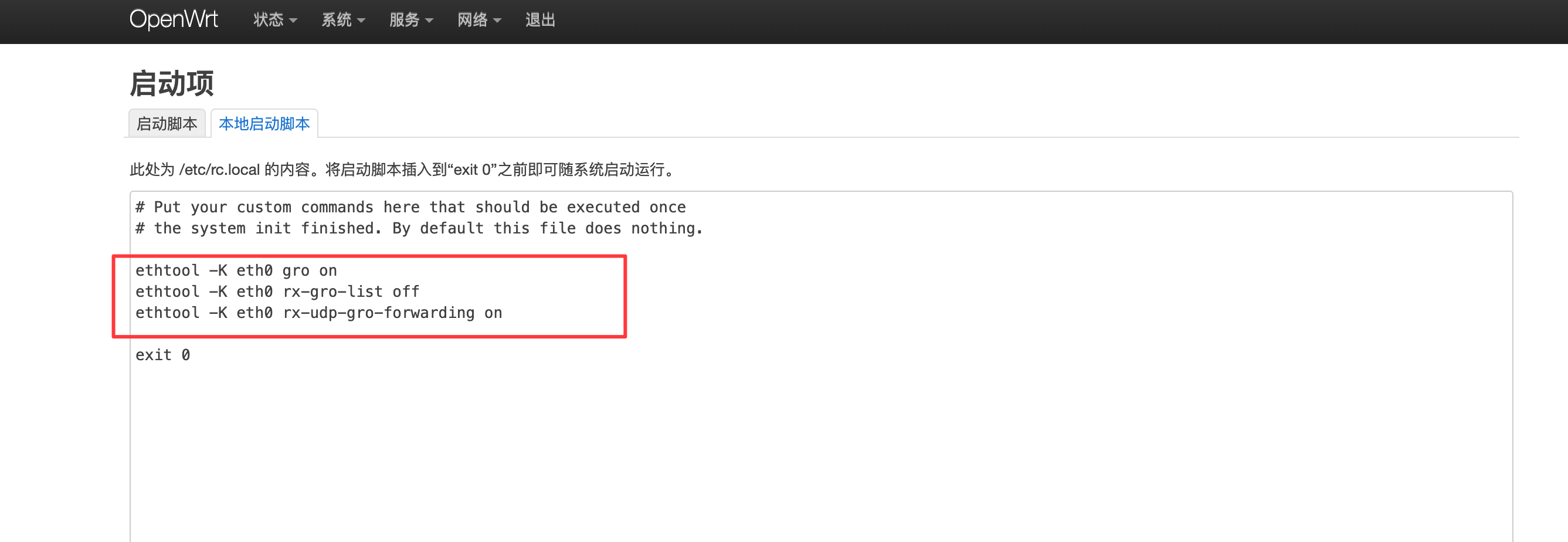
UDP GRO(Generic Receive Offload,通用接收分载) 功能优化配置
- 安装ethtool
ethtool -k eth0 | grep -E "gro|udp" 验证状态
宣告exit node
tailscale up --advertise-exit-node --accept-dns=false --login-server=xxxxheadscale服务端
headscale nodes list

headscale nodes list-routes --identifier <id>
# 批准
# --routes 0.0.0.0/0 所有网段都代理
headscale nodes approve-routes --identifier <id> --routes 0.0.0.0/0

headscale nodes list-routes --identifier 6
其他设备
选择exit node
防火墙设置
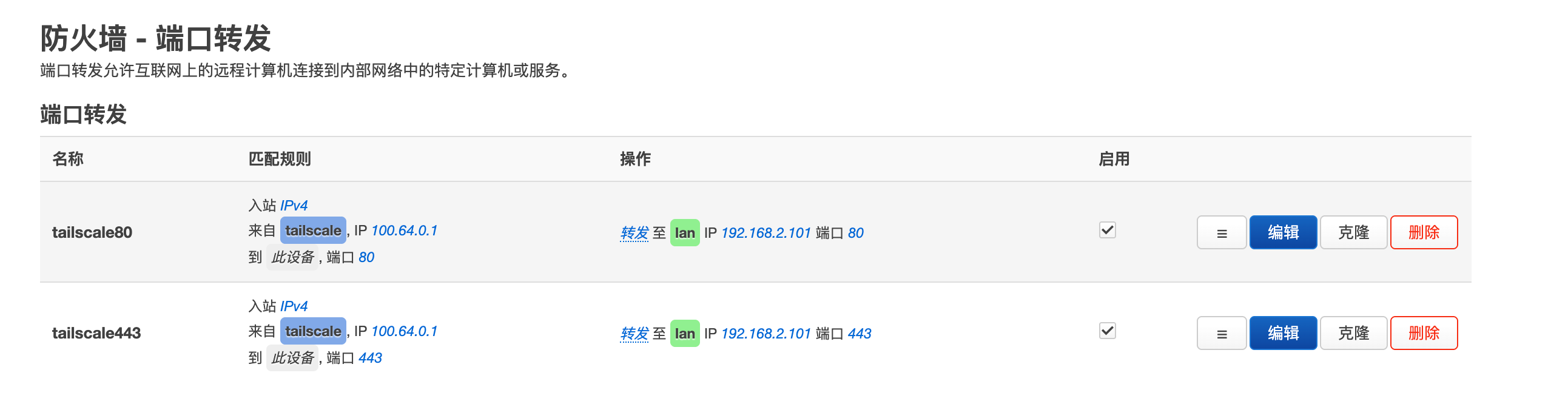
防火墙设置端口转发 限定 100.64.0.1才转发
passwall2设置
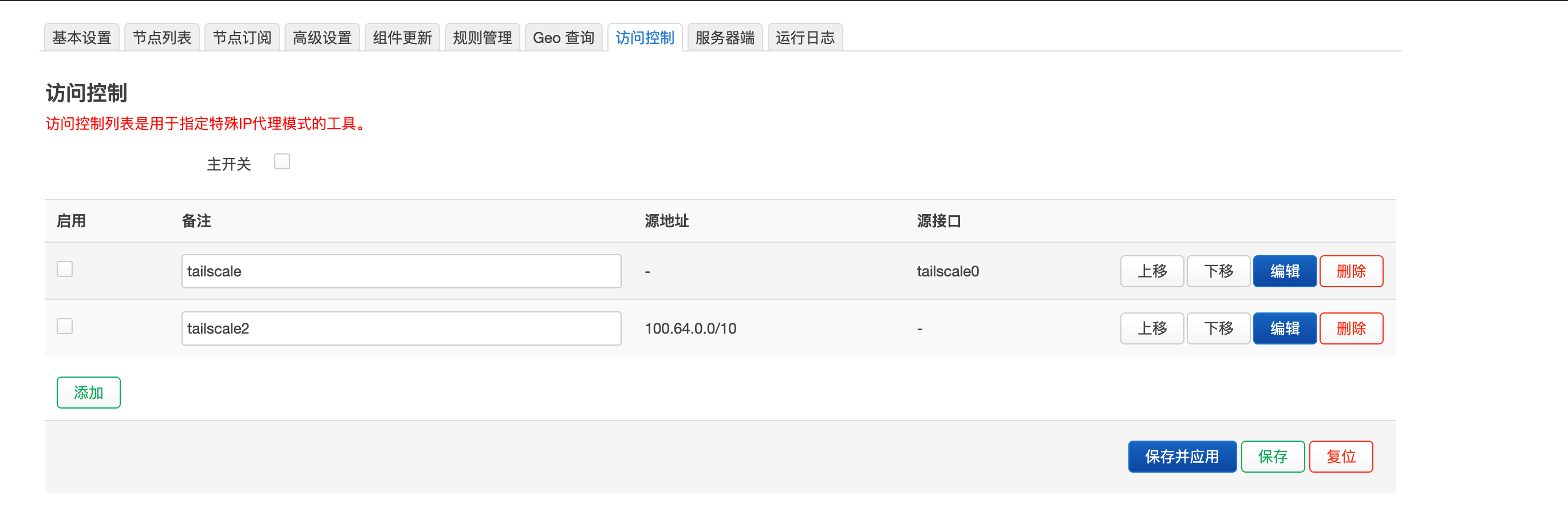
访问控制 取消tailscale0网卡的不代理
docker
colima
安装
brew install colimadocker
colima start --profile dk --cpus 8 --memory 12 --disk 100 --vm-type vz --mount-type virtiofs --mount-inotify --ssh-agent --vz-rosetta- –cpus 核心数
- –memory 内存 gb
- –disk 磁盘 gb
- –vm-type 虚拟机类型 qemu, vz, krunkit
- –vz-rosetta Rosetta 转译技术
- –mount-type 挂载类型 sshfs, 9p, virtiofs
- –mount-inotify 挂载文件变更,强行在 Linux 虚拟机内部“模拟”抛出一个对应的
inotify信号 - –ssh-agent 宿主机上的 SSH 密钥认证代理(SSH Agent)安全地转发到 Linux 虚拟机
ssh-agent
environment:
    - SSH_AUTH_SOCK=/ssh-agent.sock # 容器内自定义一个固定的 socket 位置
  volumes:
    # 直接把 Mac 本地的真实变量挂载进容器对应的位置
    - ${SSH_AUTH_SOCK}:/ssh-agent.sock
stop
# Stop default profile
colima stop

# Stop specific profile
colima stop dk
restart
# Restart default profile
colima restart

# Restart specific profile
colima restart dk
delete
colima delete [profile] [flags]

colima delete dk --data --force- –data 删除数据
- –force 强制删除
status
colima status dklist
colima list
colima list  --json
ssh
# Interactive SSH session
colima ssh

# Run a command
colima ssh -- ls -la

# Run command in specific profile
colima ssh dev -- docker ps

colima ssh -p dk
update
colima updateversion
colima versionconfig
colima start --edit

colima start --edit --editor code  # vscode打开

colima start dk --edit --editor code~/.colima/default/colima.yaml(default profile)~/.colima/<profile>/colima.yaml(named profiles)
设置交换内存
provision:
  - mode: system
    script: |
      if [ ! -f /swapfile ]; then
        dd if=/dev/zero of=/swapfile bs=1M count=4096
        chmod 600 /swapfile
        mkswap /swapfile
      fi
      swapon /swapfile
docker compose
手动安装
brew install docker-compose

mkdir -p ~/.docker/cli-plugins

ln -sfn $(brew --prefix)/opt/docker-compose/bin/docker-compose ~/.docker/cli-plugins/docker-compose
docker context
# List contexts
docker context ls

# Use Colima context
docker context use colima

# Use default context
docker context use default
netwrork创建
docker network create --subnet 172.20.0.0/24 --attachable  net1

docker network ls
Sing-box 安装
server
dpkg -i sing-box_1.14.0-alpha.37_linux_amd64.deb

#修复依赖(必执行,防止缺库)
apt install -f -y


vim /etc/sing-box/config.json


systemctl start sing-box
journalctl -u sing-box -f
systemctl enable sing-box
/etc/sing-box/config.json
{
  "inbounds": [
    {
      "tag": "trojan-in",
      "type": "trojan",
      "listen": "127.0.0.1",
      "listen_port": 43644,
      "users": [
        {
          "password": "xxxx"
        }
      ],
      "transport": {
        "type": "ws",
        "path": "/xxxxx",
        "headers": {
          "host": "xxxx"
        },
        "early_data_header_name": "Sec-WebSocket-Protocol"
      },
      "multiplex": {
        "enabled": true,
        "padding": false
      }
    }
  ],
  "log": {
    "level": "debug",
    "output": "/root/sing-box/logs/sing-box.log",
    "timestamp": true
  }
}
caddy
sudo apt update
sudo apt install -y debian-keyring debian-archive-keyring apt-transport-https curl

# 下载并添加官方 GPG 密钥
curl -1sLf 'https://dl.cloudsmith.io/public/caddy/stable/gpg.key' | sudo gpg --dearmor -o /usr/share/keyrings/caddy-stable-archive-keyring.gpg

# 添加 Caddy 稳定版软件源
curl -1sLf 'https://dl.cloudsmith.io/public/caddy/stable/debian.deb.txt' | sudo tee /etc/apt/sources.list.d/caddy-stable.list


sudo apt update
sudo apt install caddy

sudo systemctl status caddy
/etc/caddy/Caddyfile
node01.ccwu.cc:443 {

    reverse_proxy /xxxx 127.0.0.1:43644

}
client
修改配置文件
root@OpenWrt:~/soft/sing-box# uci set sing-box.main.conffile='/root/soft/sing-box/conf/sing-box.json'
root@OpenWrt:~/soft/sing-box# uci set sing-box.main.workdir='/root/soft/sing-box/data'
root@OpenWrt:~/soft/sing-box# uci commit sing-box
root@OpenWrt:~/soft/sing-box# cat /etc/config/sing-box

config sing-box 'main'
	option enabled '1'
	option conffile '/root/soft/sing-box/conf/sing-box.json'
	option workdir '/root/soft/sing-box/data'
	option log_stderr '1'
service sing-box start{
"log": {
"level": "debug",
"output": "/root/soft/sing-box/log/sing-box.log",
"timestamp": true
},
"dns": {
"servers": [
{
"type": "tcp",
"tag": "cn-dns",
"server": "223.5.5.5",
"server_port": 53,
"detour": "direct-out"
},
{
"type": "tcp",
"tag": "trojan-dns",
"server": "8.8.8.8",
"server_port": 53,
"detour": "trojan-out"
}
],
"rules": [
{
"server": "cn-dns",
"rule_set": [
"geosite-cn",
"geosite-cn2"
],
"domain_keyword": [
"jiajun",
"apple",
"weixin",
"tencent",
"qq",
"icloud",
"miwifi"
]
},
{
"server": "trojan-dns"
}
],
"final": "trojan-dns",
"reverse_mapping": true,
"optimistic": {
"enabled": true,
"timeout": "1d"
},
"strategy": "ipv4_only"
},
"inbounds": [
{
"type": "tun",
"tag": "tun-in",
"address": [
"172.18.0.1/30",
"fdfe:dcba:9876::1/126"
],
"auto_route": true,
"mtu": 1280,
"route_address": [
"0.0.0.0/1",
"128.0.0.0/1",
"::/1",
"8000::/1"
],
"auto_redirect": true
}
],
"outbounds": [
{
"type": "direct",
"tag": "direct-out",
"domain_resolver": "cn-dns"
},
{
"type": "trojan",
"tag": "trojan-out",
"server": "xxxx",
"server_port": 443,
"password": "xxxx",
"transport": {
"type": "ws",
"path": "/xxxx",
"headers": {
"host": "xxxx"
}
},
"tls": {
"enabled": true
},
"multiplex": {
"enabled": false,
"protocol": "smux",
"max_connections": 16,
"min_streams": 8,
"padding": false
},
"domain_resolver": "cn-dns"
}
],
"route": {
"rules": [
{
"outbound": "direct-out",
"network": [
"icmp"
],
"rule_set": [
"geoip-cn","geoip-cn2"
]
},
{
"network": [
"icmp"
],
"action": "reject",
"method": "reply"
},
{
"action": "sniff"
},
{
"port": [
53,853
],
"action": "hijack-dns"
},
{
"outbound": "direct-out",
"ip_cidr": [
"192.168.0.0/16",
"127.0.0.1"
]
},
{
"action": "route-options",
"udp_connect": true,
"ip_cidr": [
"100.64.0.0/10"
]
},
{
"outbound": "tailscale",
"ip_cidr": [
"100.64.0.0/10"
]
},
{
"outbound": "direct-out",
"domain_keyword": [
"jiajun",
"apple",
"weixin",
"tencent",
"qq",
"icloud",
"miwifi"
]
},
{
"action": "route-options",
"udp_connect": true,
"domain_keyword": [
"gstatic",
"google",
"gvt2"
]
},
{
"outbound": "trojan-out",
"domain_keyword": [
"gstatic",
"google",
"gvt2"
]
},
{
"outbound": "direct-out",
"rule_set": [
"geosite-cn",
"geosite-cn2"
]
},
{
"action": "route-options",
"udp_connect": true,
"rule_set": ["geoip-cn","geoip-cn2"],
"invert": true
},
{
"outbound": "trojan-out",
"rule_set": ["geoip-cn","geoip-cn2"],
"invert": true
},
{
"outbound": "direct-out",
"ip_cidr": [
"0.0.0.0/1",
"128.0.0.0/1",
"::/1",
"8000::/1"
]
}
],
"auto_detect_interface": true,
"rule_set": [
{
"type": "remote",
"tag": "geosite-cn",
"format": "binary",
"url": "https://raw.githubusercontent.com/SagerNet/sing-geosite/rule-set/geosite-geolocation-cn.srs",
"update_interval": "1d",
"http_client": "http-client"
},
{
"type": "remote",
"tag": "geoip-cn",
"format": "binary",
"url": "https://raw.githubusercontent.com/SagerNet/sing-geoip/rule-set/geoip-cn.srs",
"update_interval": "1d",
"http_client": "http-client"
},
{
"type": "remote",
"tag": "geosite-cn2",
"format": "binary",
"url": "https://github.com/DustinWin/ruleset_geodata/releases/download/sing-box-ruleset/cn.srs",
"update_interval": "1d",
"http_client": "http-client"
},
{
"type": "remote",
"tag": "geoip-cn2",
"format": "binary",
"url": "https://raw.githubusercontent.com/Loyalsoldier/geoip/release/srs/cn.srs",
"update_interval": "1d",
"http_client": "http-client"
}
]
},
"http_clients": [
{
"tag": "http-client",
"detour": "trojan-out"
}
],
"experimental": {
"cache_file": {
"enabled": true,
"path": "/root/soft/sing-box/data/cache.db",
"cache_id": "",
"store_fakeip": false
}
},
"services": [
{
"type": "api",
"listen": "0.0.0.0",
"listen_port": 6789,
"secret": "xxxx",
"access_control_allow_private_network": true,
"dashboard": {
"enabled": true,
"path": "/root/soft/sing-box/data/dashboard",
"http_client": "http-client",
"update_interval": "1d"
}
}
],
"endpoints": [
{
"type": "tailscale",
"tag": "tailscale",
"state_directory": "/root/soft/sing-box/data/.tailscale",
"control_url": "https://xxxx:4000",
"accept_routes": false,
"advertise_routes": [
"192.168.2.0/24"
],
"advertise_exit_node": true,
"advertise_tags": [],
"system_interface": false,
"udp_timeout": "5m",
"system_interface_mtu": 1280,
"domain_resolver": "cn-dns",
"detour": "direct-out"
}
]
}logrotate
cat /etc/logrotate.d/sing-box
/root/soft/sing-box/log/sing-box.log {
    daily
    rotate 7
    missingok
    notifempty
    copytruncate
}


cat /etc/logrotate.conf
crontab
0 0 * * * /usr/sbin/logrotate /etc/logrotate.confMac logrotate
/opt/homebrew/etc/logrotate.conf
 cat /opt/homebrew/etc/logrotate.d/nginx
/Users/lambda/software/docker/nginx/data/logs/*.log {
    daily
    rotate 7
    missingok
    notifempty
    sharedscripts
    postrotate
        /opt/homebrew/bin/docker compose -f /Users/lambda/software/docker/nginx/docker-compose.yaml exec -T nginx nginx -s reopen
   endscript
}
brew services list

Name      Status    User   File

logrotate scheduled lambda ~/Library/LaunchAgents/homebrew.mxcl.logrotate.plist
launchctl unload ~/Library/LaunchAgents/homebrew.mxcl.logrotate.plist
launchctl load ~/Library/LaunchAgents/homebrew.mxcl.logrotate.plist